You have 2 pricing pages open and a decision to make. Neither one tells you what the other costs, and neither one is priced in the same unit, so the comparison you want does not exist on either page.
Both tools sell the same outcome. Data out of a business system, sitting in a spreadsheet, refreshing without anyone touching it. They charge for that outcome in different units. Coupler.io charges once for the account. Coefficient charges for the seat above one person. That single difference swings the bill by 3 figures a month in either direction, and which direction depends entirely on how many people in your company are going to build and refresh the imports.
Everything below was pulled from the 2 vendors' own pricing pages and documentation on 22 July 2026, not from a listicle.
Short version: Coefficient is cheaper while 1 or 2 people build the imports, Coupler.io is cheaper from 3 people up, and past 5 people Coefficient stops publishing a price at all. Coupler.io can also send the data to Looker Studio, Power BI and BigQuery, where Coefficient only fills spreadsheets. Coefficient writes edits back into Salesforce and HubSpot, which Coupler.io does not advertise doing.
Disclosure: this page is published by Airtable to Sheets, a Google Sheets add-on that competes with both of these tools on the Airtable use case specifically.
Quick comparison
I checked each vendor's own pages on 22 July 2026.
| Coupler.io | Coefficient | |
|---|---|---|
| What it is | A cloud data platform | A spreadsheet add-in |
| Priced by | The account | The account on Starter, the seat on Pro |
| Entry paid plan | $32/mo, or $24/mo billed annually | $49/mo, one person |
| Cheapest multi-person plan | $132/mo, unlimited users | $99/user/mo, 5 users maximum |
| Fastest published refresh | Every 15 minutes, on Agency and Enterprise | Every hour, on Pro |
| Where it runs | A web app you sign into | A sidebar inside Google Sheets and Excel |
| Destinations | Sheets, Excel, Looker Studio, Power BI, Tableau, BigQuery, Snowflake, PostgreSQL, Redshift | Google Sheets and Excel |
| Sources, and what it leads with | 400+, led by ad platforms, analytics and accounting | 150+, led by Salesforce, HubSpot, QuickBooks, NetSuite |
| Writes back to the source | Not advertised | Yes, on connectors marked two-way |
| Free plan | 1 source and 1 destination with 100 rows per run and manual refresh | 3 sources, 5,000-row imports, 50 refreshes a month, manual refresh |
| Free trial | 7 days | 30 days on Pro |
Per account or per user: the split that decides it
Coupler.io sells you a workspace. Starter is a one-person plan, but from Active upward the published limit is "unlimited users", and Coupler.io's documentation counts a user as a unique email across the organisation. Whether 2 people or 20 log in and build importers, the subscription price does not move. What moves it is how many source accounts you connect, 3 on Starter, 15 on Active, 50 on Pro, and how often you want the data refreshed.
Coefficient sells you a seat. Starter is $49 a month and it is a single-person plan. The moment a second person needs to create an import or schedule a refresh in their own spreadsheet, you are on Pro at $99 per user per month, and Pro carries a hard ceiling of 5 users.
Both vendors are clear that people who only read the finished spreadsheet pay nothing. Coefficient's pricing FAQ says unlicensed teammates "can access data in your spreadsheets if you've provided them with an accessible share link", but "will not have the ability to edit your imports or schedule automated refreshes". So the number driving your bill is not headcount. It is how many people build things, which is usually much smaller than anyone assumes at the start of an evaluation. Count it honestly before you compare prices, because it is the whole comparison.
What each one costs at 1, 5 and 15 people
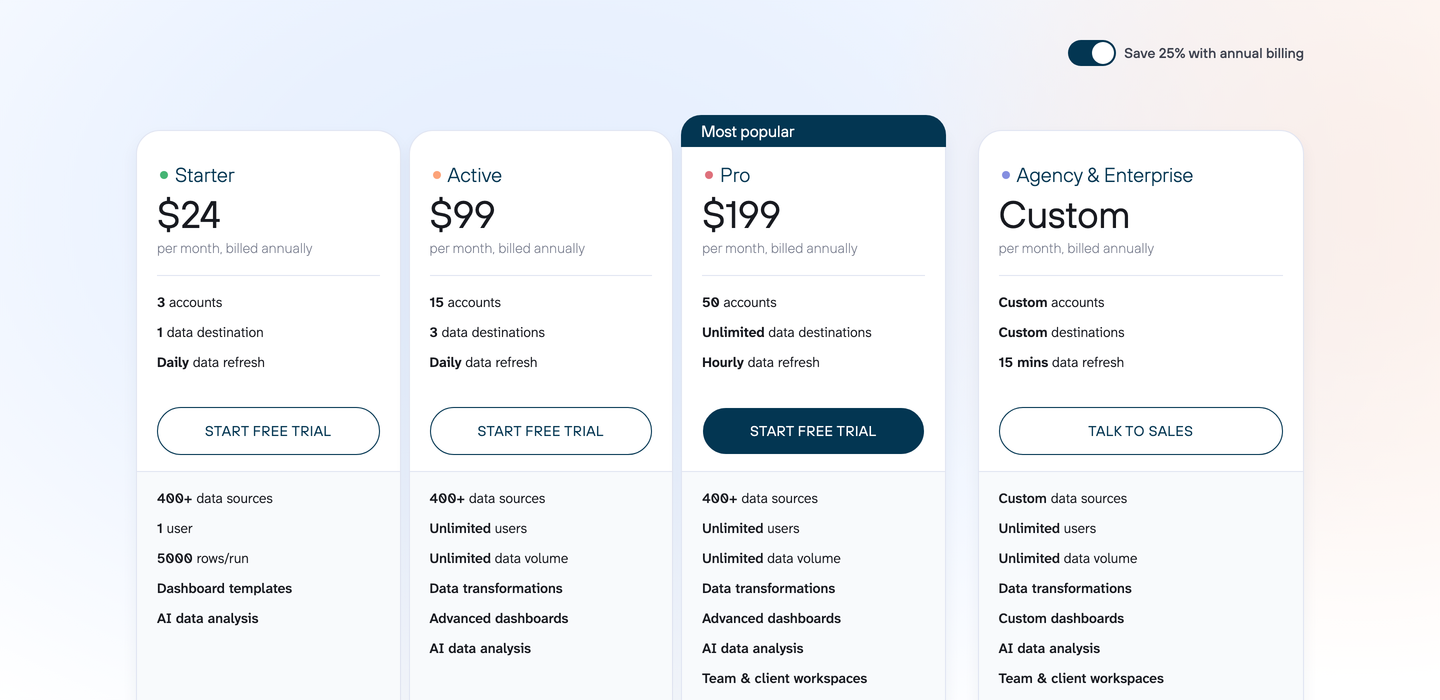
Coupler.io's pricing page. Screenshot taken on 22 July 2026.
For the tier-by-tier reading of that page on its own, including what a source account counts as, see Coupler.io pricing.
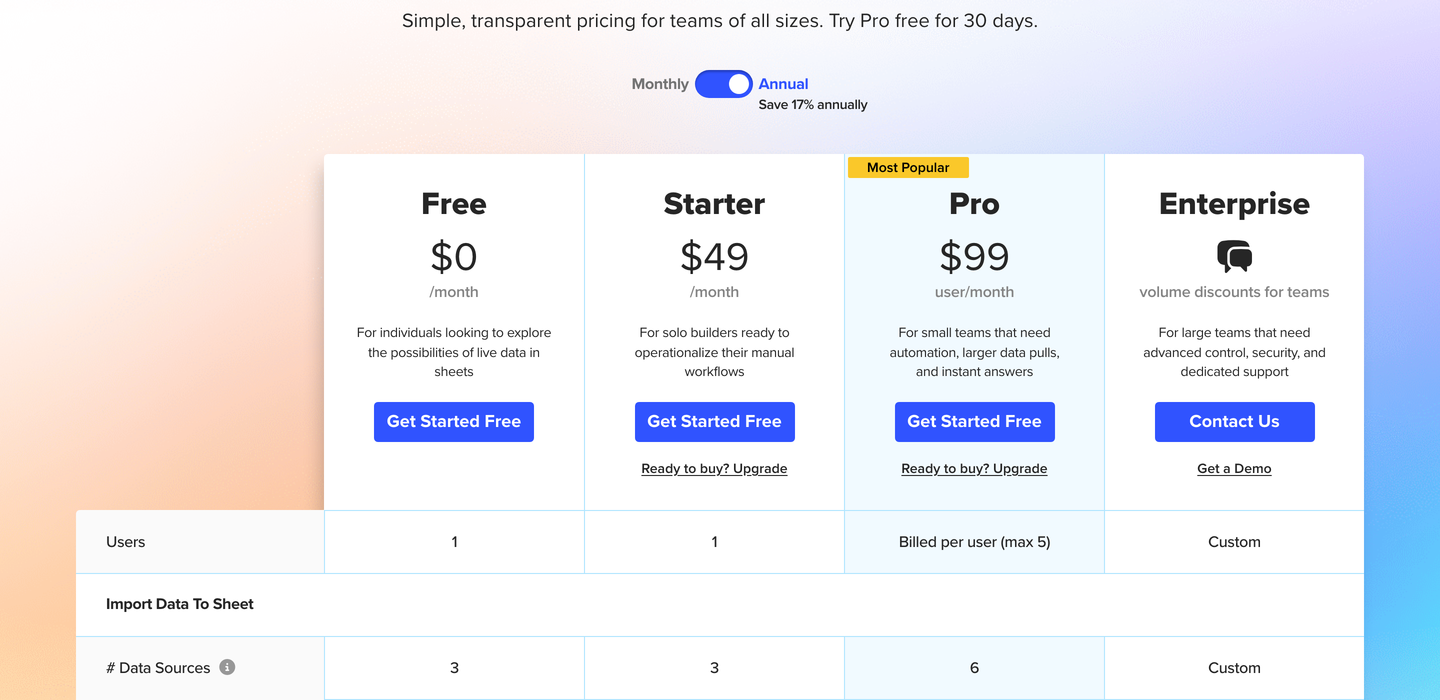
Coefficient's pricing page. Screenshot taken on 22 July 2026.
Compare like for like: hourly refresh on both sides, which means Coupler.io Pro against Coefficient Pro. Monthly billing.
| People building imports | Coupler.io Pro | Coefficient Pro | Cheaper |
|---|---|---|---|
| 1 | $259 | $99 | Coefficient, by $160 |
| 2 | $259 | $198 | Coefficient, by $61 |
| 3 | $259 | $297 | Coupler.io, by $38 |
| 5 | $259 | $495 | Coupler.io, by $236 |
| 15 | $259 | Not published, Pro caps at 5 | Coupler.io |
Annual billing moves both numbers and leaves the answer alone. Coupler.io Pro drops to $199 a month. Coefficient takes 17% off, so $99 becomes about $82 a seat. One seat $82, two $164, three $247 against Coupler.io's $199. The crossover is still the third person.

At daily refresh rather than hourly, the gap opens earlier. One person on Coupler.io Starter is $32 a month, or $24 billed annually, against $49 for Coefficient Starter. 5 people on daily refresh is $132 a month on Coupler.io Active, flat, with unlimited users. Coefficient has no multi-person daily plan, so the 5 of you either buy 5 separate Starter accounts at $245 a month with no shared connections between them, or move to Pro at $495 for refresh you did not ask for.
Refresh frequency is the other thing you are paying for
Neither tool charges for data. Both charge for how stale you are willing to let it get.
Coupler.io's published floor by plan is manual on Free, daily on Starter and Active, hourly on Pro, and every 15 minutes on Agency and Enterprise, which is custom priced. Worth knowing before you sign: Coupler.io's Airtable to Google Sheets landing page advertises scheduling "at a custom frequency, up to every 15 minutes", and the pricing page reserves 15-minute refresh for the Agency and Enterprise tier. Both were live on 22 July 2026. If a 15-minute cycle is the reason you are buying, get the tier confirmed in writing.
Coefficient's published floor is manual on Free, daily on Starter, and hourly on Pro. Its scheduling documentation describes hourly options of every 1, 2, 4 or 8 hours. There is no published sub-hourly refresh on any Coefficient plan.
Coefficient also meters the refresh count. Frequency is one limit and count is the other: 50 a month on Free, 500 on Starter, 5,000 on Pro. An hourly schedule running around the clock is about 720 runs a month per import, so on Pro that allowance covers 6 or 7 always-on hourly imports before the count, rather than the frequency, becomes the thing stopping you. Coupler.io publishes no monthly run allowance; its limits are on connected accounts, destinations and rows per run.
Data destinations
Coefficient is a spreadsheet product. It puts data into Google Sheets and into Excel, and that is the list. If your dashboard lives somewhere else, the spreadsheet is a stop on the way and you build the rest of the chain yourself.
Coupler.io publishes Google Sheets, Excel, Looker Studio, Power BI, Tableau, BigQuery, Snowflake, PostgreSQL and Redshift as destinations, plus CSV and JSON, and prices them: one destination on Starter, three on Active, unlimited on Pro. If the report is a Looker Studio dashboard, or the data has to land in a warehouse the analytics team already runs, Coefficient is not competing for that job. If the spreadsheet is the final artefact, that whole list is capability you would pay for and never open.
Write-back, alerts, and what each is strongest on
Coefficient runs in both directions on the connectors it marks as two-way, including Salesforce, HubSpot, QuickBooks, Shopify, BigQuery and MySQL. Edit a value in the sheet, push it back to the source system. Those exports are metered too: 100 rows and 50 runs a month on Free, 500 and 500 on Starter, unlimited rows and 5,000 runs on Pro. Alerts are a separate allowance, 30 a month on Free, 100 on Starter, 300 on Pro, sent to Slack or email when a condition you set is met.
Coupler.io's site describes the flow in one direction, source to destination. There is no write-back feature documented on it that I could find, and its pricing page does not list an alert allowance.
The source lists diverge in a way that matches who each company sells to. Coupler.io's integration directory leads its Popular section with QuickBooks, Shopify, GoHighLevel, Google Ads, Facebook Ads, Google Analytics 4, TikTok Ads and LinkedIn Ads. That is an agency and marketing reporting product. Coefficient's homepage leads with Salesforce, HubSpot, QuickBooks, NetSuite and Snowflake. That is a revenue and finance team product. Check your own source is available at the tier you plan to buy. Existence alone is not enough: Coefficient counts sources per plan, 3 on Free and Starter and 6 on Pro, and reserves premium sources for Enterprise.
