Airtable to Sheets vs Coefficient: the pricing shape
Airtable to Sheets vs Coefficient: a per-user platform across 150+ connectors against a flat per-account add-on for a single one. Prices checked 22 July 2026.
You have 2 tabs open. One is the Google Workspace Marketplace listing for Coefficient, 634,000 installs, a connector for roughly 150 systems. The other is this one, a connector for Airtable and nothing else.
Both are Google Sheets add-ons. Both install from the same Marketplace, both appear under Extensions, both open a sidebar and write Airtable records into a tab. From where you are sitting they do the same job at very different prices.
The difference is not speed, and it is mostly not the Airtable connector. It is the shape of the bill. We sell this add-on, so read the numbers below rather than the adjectives; every price has a date on it and a page you can check.
If your company already runs Coefficient for Salesforce or HubSpot, add Airtable to it and stop reading. If Airtable is the only system you need in the sheet and more than one person sets up syncs, the arithmetic is stark: Coefficient's Pro tier is $99 per user per month and ours is $19 per account per month, so 4 people is $396 against $19 for the same table landing in the same tab.
Quick comparison
I checked each vendor's own pages on 22 July 2026.
Airtable to Sheets
Coefficient
Price
$9, $19 or $39 per month
Free, $49/mo, $99 per user/mo, Enterprise custom
Priced per
Account
User on Pro; Starter is one individual
Connectors
1 (Airtable)
150+
Fastest scheduled refresh
Every 3 hours (Pro, Business)
Hourly (Pro), daily (Starter), manual (Free)
Where it runs
Google Sheets add-on, Extensions menu
Google Sheets add-on, Extensions menu
Direction
One-way; two-way on Business
Import from Airtable; write-back published for Salesforce and HubSpot
Bases, tables and views; help centre says view filters and sorting are reflected
Row limits
None on our side
5,000 rows on Free, unlimited on Pro
The axis that decides this: per user or per account
Most comparisons in this category turn on refresh frequency. This one does not, because both tools sit in the same Extensions menu. It turns on how the 2 vendors count you.
Coefficient's Pro plan is $99 per user per month, capped at 5 users. Starter is $49 a month, and Coefficient's own FAQ states that Starter is for individual users and that organisations with more than one user must move to Pro. The price rises with headcount by design, which is right for the product it is: a revenue-ops tool where one analyst wires up Salesforce, HubSpot and a warehouse in one workbook and gets a lot out of that single seat.
Our price does not move. $19 a month is $19 a month whether 1 person or 9 set up syncs.
Count the people who build and refresh imports. Readers cost nothing on either side.
Refresh frequency is not the difference here
On this site we lose the frequency argument against cloud platforms and we say so. Coupler.io runs on its own servers and can refresh every 15 minutes if you pay for that tier. We cannot, because a Google Sheets add-on runs on Apps Script and Apps Script schedules its runs in hours.
Coefficient is not a cloud platform in that sense. It is a Sheets add-on, and its published schedule options are hourly, every 2, 4 or 8 hours, daily, or weekly. Its pricing page tops out at hourly auto-refresh on Pro, daily on Starter, and manual only on Free. That is the same ceiling we live under, and it would be easy to imply otherwise, so: same ceiling.
Hourly does beat every 3 hours. If a number goes wrong within 3 hours of Airtable changing, Coefficient Pro is the faster of the 2 and no amount of arithmetic fixes that. Our 3-hour interval is paced against Airtable's rate limit, which a large table can otherwise hit while paging through records.
Neither of us does minutes. If your job needs a sheet that is correct within 15 minutes, buy a cloud platform and skip both add-ons. The full argument, with the Google quota it comes from, is in how to sync Airtable to Google Sheets automatically.
One connector against 150
Coefficient's integrations page counts 150 or more sources and leads with Salesforce, HubSpot, NetSuite, Snowflake, Tableau, QuickBooks and Google Ads. That is the product. Airtable has its own connector page and its own help centre article, so it is properly supported, but it is not one of the sources the tool is built around, and its Airtable how-to was last modified in February 2024.
We have one connector. That is a real limitation: the day you need Stripe in the same workbook, we are of no help and you are shopping again.
The other side of one connector is that the sidebar speaks Airtable. Bases, tables, views, field types. There is no generic "data source" abstraction between you and your base, and support questions get answered by people who only have to know one product.
What each does with Airtable views and field types
Both tools sync a view rather than only a whole table, which matters more than most feature lists suggest. A view carries the filter and the sort you already maintain in Airtable, so the tab arrives holding the rows you want in the order you want them, and the filter logic stays in one place instead of being restated as spreadsheet formulas.
Coefficient imports bases, tables and views. Its help centre states that filters and sorting options are reflective of the Airtable view when imported, and its import preview shows a 50-row sample of the fields you selected. Columns can be added or removed before or after the import.
On our side: the sync connects through Airtable OAuth, so there is no personal access token to generate and rotate. It asks Airtable for display values, so linked records arrive as readable names rather than internal record codes. It writes a locked record-ID column for join keys.
What Coefficient does with linked records, rollups, attachments and long text is not documented on any page we could find, so we are not going to tell you it gets them wrong. Test your own base on its free plan first. Which Airtable columns survive the trip covers what to look for once the data lands.
Free tiers
Coefficient has a real free plan and we do not. Free gives you 3 standard data sources with 1 account on each. Imports are capped at 5,000 rows with 50 manual refreshes a month and no scheduled refresh. That is enough to answer "does this read my base correctly", and enough to run a small table you refresh by hand twice a week, forever, for nothing.
Our trial is 7 days with no credit card, then $9 a month at the entry tier. Coefficient's Pro trial is 30 days. If a free-forever plan decides it for you, this section is the answer and the rest of the page will not change it.
Pricing
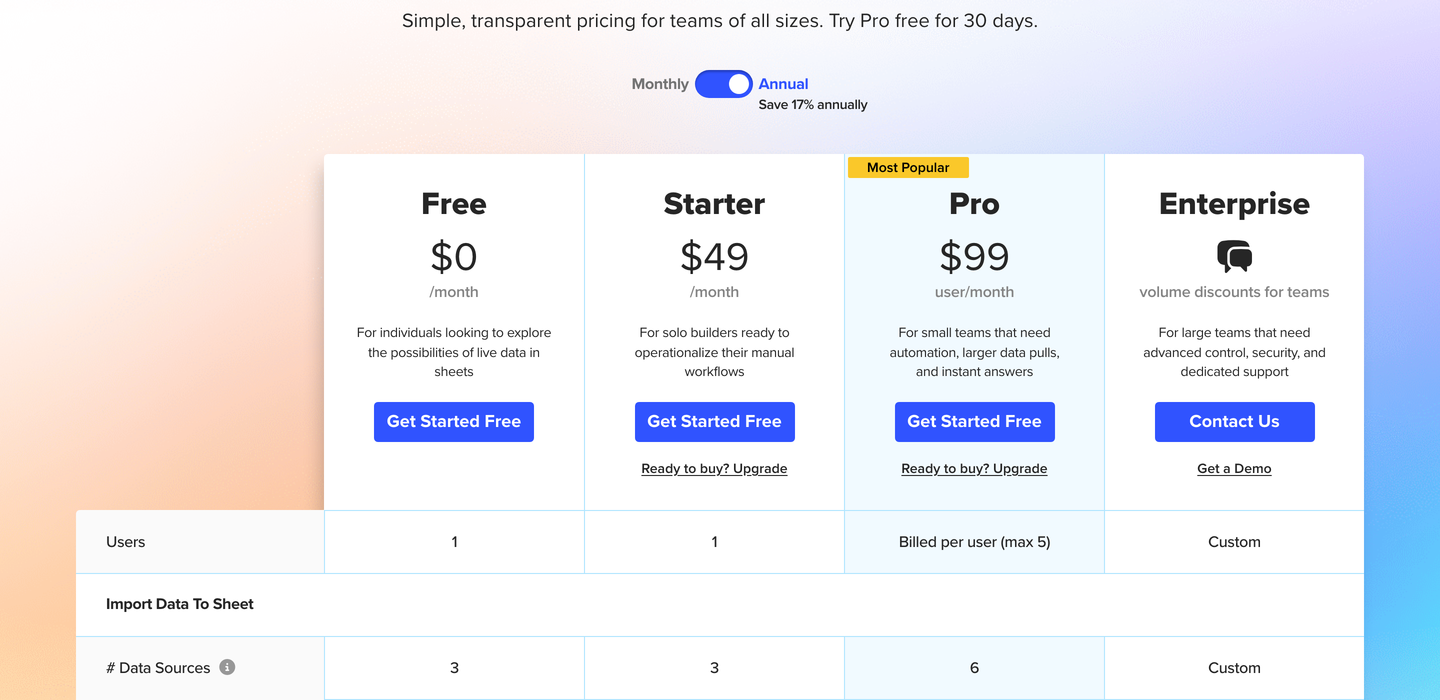
Coefficient's pricing page, captured the day these figures were checked. Screenshot taken on 22 July 2026.
All figures below were checked on 22 July 2026 on coefficient.io/pricing and on our own pricing page. Prices in this category move, so re-check before you sign anything.
Coefficient
Plan
Price
Refresh
Notable limits
Free
$0
Manual only
3 sources, 5,000-row imports, 50 refreshes/month
Starter
$49/month
Daily
Single user with 1 account per source and 500 refreshes/month
Pro
$99 per user/month
Hourly
6 sources, unlimited rows, 5 users maximum
Enterprise
Not published
Unlimited refreshes
Premium sources, SSO, admin controls
Annual billing takes 17% off, per the same page.
Airtable to Sheets
Plan
Price
Refresh
What it covers
Starter
$9/month or $90/year
Manual
Up to 3 tables or views
Pro
$19/month or $190/year
Every 3 hours
Unlimited tables and views
Business
$39/month or $390/year
Every 3 hours
Everything in Pro plus two-way sync
Flat per account, no per-user charge, no per-row charge, no record cap on our side. 30-day money-back guarantee.
The arithmetic at 3 team sizes
One person. Coefficient Starter is $49 and refreshes daily. Our Pro is $19 and refreshes every 3 hours. To get hourly out of Coefficient you move to Pro at $99. So at one person the cheaper tool is also the faster one, unless you need a second source, in which case $49 buys you 150 of them.
4 people. Coefficient Pro is $396 a month, $4,752 a year at list. Ours is $19 a month, $190 a year. The gap is $4,562 a year for the same Airtable table landing in the same tab, and it exists because Coefficient is charging for 150 connectors you are not using.
10 people. You cannot buy Pro at all, because Pro caps at 5 users. 10 people means an Enterprise quote and a sales call, at a price Coefficient does not publish. Ours is still $19, or $39 with two-way sync.
Run it the other way before you decide. If those 4 people need Salesforce, HubSpot and Airtable in one workbook, $396 buys all 3 through one sidebar with one support queue. Our $19 plus a Salesforce connector plus a HubSpot connector is 3 subscriptions and 3 vendors, and it will not land near $19.
Who should choose Coefficient
If Coefficient is already installed in your company for Salesforce or HubSpot, adding Airtable to it costs you a connector, and buying a second add-on to move one table is admin nobody will thank you for. Choose Coefficient.
Choose it if the sheet needs more than one system in it. Airtable next to Stripe next to Google Ads in a single workbook is the job the product was built for, and doing that with single-purpose add-ons means one subscription per source and a different sidebar for each.
Choose it if hourly matters. Pro refreshes hourly and we refresh every 3 hours, and that is a genuine difference for a number somebody acts on during the working day.
Choose it if you need alerts when a cell crosses a threshold, or scheduled snapshots of a table as it looked last Tuesday. We do neither, and both are on Coefficient's plans.
Choose it if you need to push a corrected value from the sheet back into Salesforce or HubSpot. We do not connect to those systems at all, at any price.
Who should choose Airtable to Sheets
Choose this if Airtable is the only system that needs to reach the sheet and more than one person sets up syncs. Everything else on this page is detail; the per-user line is the argument. At 4 people the difference is over $4,500 a year, and you are paying it for connectors nobody on the team will open.
Choose it if edits made in the spreadsheet have to reach Airtable. Two-way sync is $39 a month flat on the Business plan. Coefficient publishes write-back for Salesforce and HubSpot; it does not publish it for Airtable.
Choose it if the Airtable specifics decide whether the sheet is usable. A view syncs with its filter and sort intact, linked records arrive as the names a human would recognise rather than record codes, and a locked record-ID column gives you something stable to join on when you build the report on a second tab.
Choose it if you have a lot of tables. Pro is unlimited tables and views at $19, and there is no row cap on our side.
Choose it if you want a number you can put in a budget and never revisit. It does not change when the team grows, when the table gets longer, or when you add a fifth view.
The verdict
Coefficient is a multi-connector platform priced per seat, and per-seat pricing is correct when one seat unlocks 150 systems. We are one connector priced per account, and flat pricing is correct when there is one system and several people. The question is not which tool is better built. It is whether the sheet needs Airtable alone or Airtable among others, and how many people will be sitting in front of the sidebar.
FAQ
Is Coefficient free for Airtable?
There is a free plan with 3 standard data sources, and Airtable is a standard source. The limits that bite are the 5,000-row import cap and 50 manual refreshes a month with no scheduled refresh, so a free Coefficient sync is a button you press rather than something that keeps itself current.
Does Coefficient charge per user?
Pro does, at $99 per user per month, with a maximum of 5 users. Starter at $49 is a single-user plan; Coefficient's FAQ says organisations with more than one user need Pro. Above 5 users the price is an Enterprise quote.
Can either tool refresh a Google Sheet in real time?
No. Both run as Sheets add-ons on Apps Script, which schedules its runs in hours. Coefficient's fastest published option is hourly, ours is every 3 hours. Anything advertising minutes is running on its own servers rather than inside your spreadsheet, and charges accordingly.
Can I install both add-ons in the same spreadsheet?
Yes. Both come from the Marketplace and both appear under Extensions. Give each one its own tab so neither overwrites the other's output, and keep the report on a third tab, which is the 2-tab pattern applied twice.
Does Coefficient send data from the sheet back into Airtable?
Coefficient documents write-back for Salesforce and HubSpot. We could not find published documentation for writing back into Airtable, so treat it as unconfirmed and ask their support before buying on that basis. Two-way sync to Airtable is on our Business plan at $39 a month.
What happens to my bill if the team grows?
On Coefficient Pro, each extra person adds $99 a month until the 5-user cap, then it is Enterprise pricing that is not published. On our side the number does not move.
Related reading
Still choosing a method rather than a vendor? Start with how to sync Airtable to Google Sheets, which walks the 4 real options and the limit on each.