Airtable to Sheets vs Coupler.io: the honest split
Airtable to Sheets vs Coupler.io on real prices checked 22 July 2026: refresh frequency, sync direction, where each one runs, and which you should buy.
You have 2 tabs open. One is Coupler.io's pricing page, the other is a Google Workspace Marketplace listing, and you are trying to work out why one of them costs more than 10 times the other to do what looks like the same job.
They are not doing the same job. That is the short answer, and the rest of this page is the detail behind it.
We make Airtable to Sheets, so read this knowing who wrote it. Each Coupler.io figure below came off Coupler.io's own pricing and documentation pages on 22 July 2026. Where Coupler.io is the right purchase, this page says which job it wins and why.
Buy Coupler.io if you need your spreadsheet refreshed more often than every 3 hours, or if Airtable is one of several sources you are pulling into one sheet. It runs on its own servers, connects 400+ sources, and does hourly refresh on its $259 per month Pro plan. Buy Airtable to Sheets if Airtable is your only source and a few refreshes a day is current enough. It runs inside your own Google account as a Sheets add-on, syncs every 3 hours, and costs $19 per month flat, with write-back to Airtable at $39.
Quick comparison
I observed all figures on 22 July 2026.
Airtable to Sheets
Coupler.io
Entry price
$9/mo, manual sync
$0 free plan with 100 rows a run
Cheapest scheduled refresh
$19/mo, every 3 hours
$32/mo, once a day
Fastest published refresh
Every 3 hours
Hourly, on the $259/mo Pro plan
Sources
Airtable
400+, Airtable among them
Destinations
The Google Sheet you opened it in
Sheets, Excel, Looker Studio, Power BI, BigQuery and more
Direction
One way; two-way on the $39/mo plan
One way. Its docs: "The import is read-only"
Where it runs
Inside your Google account, on Apps Script
Coupler.io's servers, on Google Cloud
Airtable connection
Airtable OAuth
A shareable Airtable view link
What you can sync
A base, a table, or a view
A view
Free tier
None. 7-day trial, no card
Yes. 1 source with 100 rows a run, manual
Refresh frequency is what you are paying for
Coupler.io prices its plans by how often your data updates. That is the published structure of its pricing page, which makes this comparison easy to reason about.
The free plan is manual. Starter at $32 a month is once a day. Active at $132 a month is still once a day. Hourly starts on Pro at $259 a month. 15-minute refresh, the number most roundups quote, sits on the custom-priced Agency and Enterprise tier. Its scheduling menu offers intervals from 15 minutes upward; the pricing table decides which one your plan actually gets.
Our scheduled sync runs every 3 hours on the $19 Pro plan: more often than Coupler.io's $132 tier, less often than its $259 tier.
The ceiling underneath this comes from Google, not from us. Apps Script caps scheduled triggers in Workspace add-ons at roughly one run per hour, and every add-on on the Marketplace lives under it, ours included. Cloud platforms run on their own infrastructure and are not bound by it. That freedom is what Coupler.io's higher tiers sell. The longer version of the argument is in syncing Airtable to Google Sheets automatically.
So the question is not which tool is faster. Coupler.io is faster. The question is whether the gap between 3 hours and 1 hour is worth $240 a month to you.
Where each one runs, and who holds a copy
Coupler.io pulls your Airtable records onto its own infrastructure, transforms them there, and writes the result into your spreadsheet. Its security page states that data "is stored only for as long as you have an active Coupler.io account, or until you choose to delete it", and lists SOC 2 Type II, GDPR, HIPAA and DORA compliance, on Google Cloud.
Airtable to Sheets is a Google Sheets add-on. It runs on Apps Script inside your own Google account, in the Sheets sidebar, and your records go from Airtable into your spreadsheet. No third company holds a copy, because no third company is in the path.
Neither model wins in the abstract. A vendor with SOC 2 Type II on file is easier to get past a procurement review than an add-on with no certification, which is a real advantage for Coupler.io. If the answer to "who else has this data" needs to be nobody, the add-on model settles it.
Data direction
Coupler.io's Airtable documentation is direct about this: "The import is read-only. Changes to your Google Sheet won't affect your Airtable base." Airtable goes in, nothing comes back.
Ours is one way by default too. Two-way sync is on the Business plan at $39 a month, so edits made in the spreadsheet push back into Airtable. That is the one capability here that Coupler.io does not offer for Airtable at any price.
It matters for a specific shape of work. If you send a client a spreadsheet, they fill in 3 columns, and you then retype those values into the base, two-way is the whole reason to buy anything. If nobody edits the sheet, it changes nothing and you should not pay the extra $20 for it.
Setup, and what arrives in the cell
Coupler.io is a web app. You sign up, create an importer, paste in a shareable Airtable view link, pick Google Sheets as the destination, choose a schedule, and run it. One importer covers one view, so several views means several importers. Password-protected views are supported. The Sheets add-on it publishes on the Marketplace, with 427,000+ installs, is a front end for the same cloud service rather than a separate product.
Ours installs from the Google Workspace Marketplace and opens in the sidebar of the spreadsheet you want the data in. It connects through Airtable OAuth, so there is no link to generate and no token to rotate, and a sync can point at a base, a table, or a specific view. Syncing a view means the filter and sort you already built in Airtable arrive with the data.
On what lands in the cell, we can only speak for our side. We ask Airtable for display values, so a linked record arrives as the readable name rather than an internal record code, and we write a locked record-ID column for join keys. Coupler.io does not publish how it handles individual Airtable field types, so no claim is made here about linked records, rollups or attachments on their side. Test it against your own base during the trial. Either way, which Airtable columns survive the trip applies to both tools.
Pricing
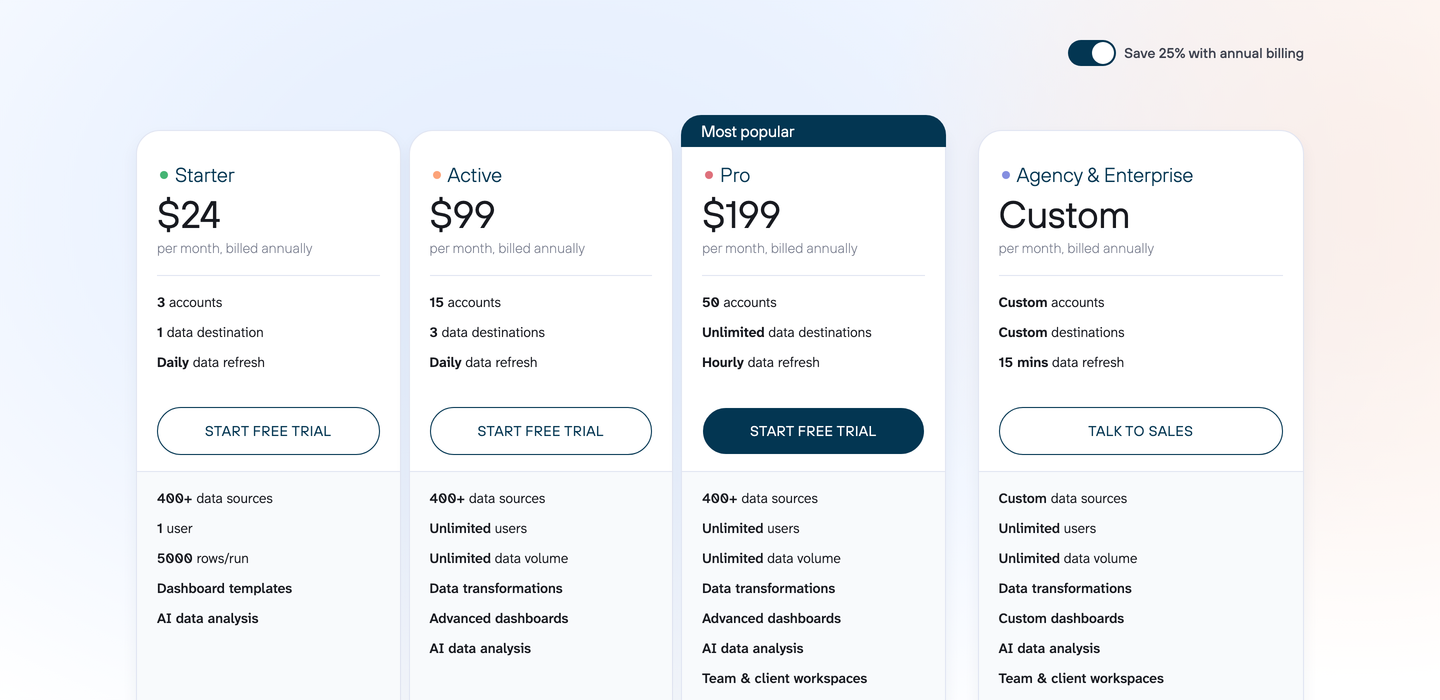
Coupler.io's pricing page, captured the day these figures were checked. Screenshot taken on 22 July 2026. Prices in this category move, so treat the screenshot as the receipt for the numbers below and re-check before you commit.
Checked on 22 July 2026, from each vendor's own pricing page. Prices in this category move; Coupler.io's entry tier has already changed more than once in the observable record, so re-check before you buy.
Coupler.io
Plan
Monthly
Billed annually
Refresh
Free
$0
n/a
Manual, 100 rows a run
Starter
$32
$24/mo
Daily
Active
$132
$99/mo
Daily
Pro
$259
$199/mo
Hourly
Agency & Enterprise
Custom
Custom
15 minutes
Free covers 1 user with 1 source and 1 destination. Starter adds 400+ sources, 3 connected accounts and 5,000 rows a run. Active raises that to 15 accounts with 3 destinations and unlimited users. Pro reaches 50 accounts and unlimited destinations. There is a 7-day trial with full access. Worth watching: several third-party pricing roundups still list plan names that are not on Coupler.io's page today, so take the numbers from the vendor.
Coupler.io pricing breaks each tier down on its own, including which of the 3 free plan limits people hit first.
Airtable to Sheets
Plan
Monthly
Yearly
What it does
Starter
$9
$90
Manual sync, up to 3 tables or views
Pro
$19
$190
Unlimited tables and views, sync every 3 hours, priority support
Business
$39
$390
Everything in Pro, plus two-way sync back to Airtable
Flat per account. No per-user charge, no per-row charge, no record cap on our side. 7-day free trial with no credit card, and a 30-day money-back guarantee. Full detail on pricing.
Who should choose Coupler.io
Choose Coupler.io if more than one source feeds the spreadsheet. If your weekly sheet pulls Airtable plus Google Ads plus HubSpot plus Stripe, you are buying one platform instead of 4 connectors, and that beats assembling it from single-source tools. Nothing we sell touches a second source, and it never will.
Choose it if hourly matters. If someone dispatches work off that sheet, or it drives an alert, or a number that is 3 hours stale means a wrong decision gets made, no Google Sheets add-on can serve you, ours included. Pay the $259 for the hourly plan, or the Enterprise tier for 15 minutes.
Choose it if the same data has to land somewhere other than Sheets. Looker Studio, Power BI, BigQuery, Snowflake and Excel are all destinations on their side. We write into a Google Sheet and nowhere else.
Choose it if procurement wants a certified vendor. SOC 2 Type II, HIPAA and DORA are on their security page. We have none of that to show you.
And if you want to try one Airtable view at zero cost, their free plan does 100 rows on a manual run. We have no free tier, only a trial.
Who should choose Airtable to Sheets
Choose us if Airtable is the only source. Coupler.io's cheapest daily-refresh plan is $32 a month and its cheapest sub-daily plan is $259, and both prices carry 400+ connectors you are not going to use. Ours is $19 a month for every 3 hours because Airtable is the only thing it does.
Choose us if the tolerance for a stale number is measured in hours. Management dashboards, client status sheets, sales forecasts, capacity counts, weekly reporting: these get looked at a few times a day and corrected long before a 3-hour gap costs anything. Buying hourly refresh for a sheet opened twice a day is buying something nobody will ever see.
Choose us if edits have to go back to Airtable. Coupler.io's Airtable import is read-only by its own documentation. Two-way sync at $39 a month is the only thing on this page that ends the retyping.
Choose us if the records should not sit on a third party's servers, since the add-on runs in your Google account and the data goes from Airtable straight to your spreadsheet. And choose us if you would rather work in the spreadsheet sidebar than in another browser tab with another login.
The verdict
Coupler.io is a data platform that happens to read Airtable. Ours is an Airtable connector that happens to be a spreadsheet add-on. If you need many sources, many destinations, sub-hourly refresh, or a certified vendor, the platform is the correct purchase and its prices are what that capability costs. If you sync Airtable into Google Sheets, a few times a day is fine, and the edits sometimes need to travel back, the platform is infrastructure you will pay for and not use.
FAQ
Is Coupler.io free?
There is a free plan, checked on 22 July 2026: 1 user on 1 source and 1 destination with manual refresh only, 100 rows a run. That is enough to test a small Airtable view. Scheduled refresh starts at $32 a month. A 2023 forum post saying the free tier had been discontinued no longer matches the pricing page.
Can Coupler.io push edits back into Airtable?
No. Its Airtable documentation states that the import is read-only and that changes to your Google Sheet will not affect your Airtable base. Two-way sync from Sheets back to Airtable is on our Business plan at $39 a month.
Why can a Google Sheets add-on not refresh every 15 minutes?
Because Apps Script caps scheduled triggers in Workspace add-ons at roughly one run per hour, and the scheduler belongs to Google rather than to any add-on. Coupler.io is not bound by that limit because it runs on its own servers. Any Sheets add-on advertising real-time refresh is either running outside Apps Script or overstating what the scheduler will do.
Which is cheaper for a single Airtable base?
Ours, for anything scheduled. Coupler.io's cheapest scheduled plan is $32 a month for a daily refresh, or $24 billed annually. Our Pro plan is $19 a month for every 3 hours. Coupler.io is cheaper only at $0, on its manual free plan.
Can I use both?
Some people should. Run Coupler.io for the multi-source reporting sheet where marketing and finance data has to meet, and run the add-on on the Airtable operations tab that needs to write back. They do not conflict, since each writes into its own tab.
If the split puts you on our side, the add-on installs from the Google Workspace Marketplace and the trial runs 7 days with no card. If it puts you on Coupler.io's side, their trial is 7 days too. Either way, test it against your real base before the invoice arrives.