Airtable to Sheets vs Whalesync: how to choose

Airtable to Sheets vs Whalesync, compared on prices checked in July 2026: instant two-way sync capped at 500 records, or $39 a month flat with no record cap.

Title card for the post, showing an Airtable table panel connected by a downward arrow to a Google Sheets panel on a dark background

You have two tabs open. One is Whalesync's pricing page, the other is ours, and the question is which one keeps your Airtable base and your Google Sheet telling the same story without you doing it by hand every Monday.

Both tools do that. They do it at different speeds, for different money, and they stop being the right answer at different points. This page is written by the people who make one of them, so the section that sends you to the other one comes with real numbers attached and it is the one to read first. Every Whalesync figure below was checked on their own site and docs on 22 July 2026.

Buy Whalesync if a change made in one tool has to appear in the other within seconds, if fewer than 500 records need to stay in agreement, or if your Airtable base also has to stay level with Webflow, Notion, Postgres or Stripe. Buy Airtable to Sheets if a three-hour refresh is fast enough, the table is big, and you want one flat bill of $39 a month for two-way sync between exactly those two tools.

Quick comparison

Airtable to Sheets Whalesync
Entry price $9/month, one-way, up to 3 tables or views $5/month Personal, which does not include the Google Sheets connector
Cheapest plan for this pairing $9/month one-way, $39/month two-way $20/month Starter
Refresh Every 3 hours on a schedule, plus manual sync any time Published as real-time. No interval figure stated on the site or in the docs
Direction One-way. Two-way on the $39 plan, pushed when you press a button Two-way on every plan
Record limit None 250 on Personal, 500 on Starter, up to 50,000 on Plus and Pro
Per-user charge None None shown on the pricing page
Where it runs In your Google account, in the Sheets sidebar On Whalesync's own servers
Apps it connects Airtable and Google Sheets 15 connectors listed in their docs, including Webflow, Notion, Postgres, Stripe
Free trial 7 days, no credit card 2 weeks
Airtable views Sync a base, a table, or a view, with its filter and sort Supported, and their docs say view-based syncing does not run with two-way sync

All Whalesync figures checked on 22 July 2026.

The one axis that decides this

Everything else is detail. The decision is how long a change is allowed to sit in one tool before it appears in the other, and what that speed costs at your row count.

Whalesync runs on its own servers, and its Airtable connection asks for permission to watch the base for changes, so it reacts to an edit rather than waiting for a clock. Their published wording is "real-time updates" on every plan and, on the homepage, "when data changes in one app, it syncs to the other instantly". They publish no interval in seconds or minutes anywhere we could find, so treat "instant" as their claim rather than a measured number.

Airtable to Sheets is a Google Sheets add-on. It runs on Apps Script inside your Google account, and Google caps scheduled triggers in Workspace add-ons at roughly one run per hour. That limit belongs to Google, and no add-on on the Marketplace can code around it, ours included. Our scheduled sync runs every 3 hours, inside the ceiling with room to spare and paced for Airtable's own request limits. The full argument sits in syncing Airtable to Google Sheets automatically.

So the split is not a feature list, it is a platform difference. If your job needs minutes, a Sheets add-on cannot serve you and no pricing changes that.

Two-panel figure comparing sync speed against price. A note at the top states that anything running inside a Google Sheets add-on is capped by Google at roughly one scheduled run per hour. Whalesync is shown as real-time at 20 dollars a month with a 500 record cap. Airtable to Sheets is shown as every 3 hours at 39 dollars a month flat with no record cap.

Records are the second price axis

Whalesync prices by records in sync, and their pricing page defines that fairly: a record counts once when it first syncs, records are not double counted across the two apps, and updates to a record already counted are unlimited. Google Sheets is not one of the four connectors on the $5 Personal plan, so this particular job starts at Starter, which is $20 a month for 500 records in sync.

Above 500 you are on Plus at $40 a month for 1,000 records in sync, or Pro at $200 a month for 2,000. Both tiers carry a record-count selector, so the published figure is the entry point for that tier rather than the whole story, and the price climbs with the count you pick, up to 50,000.

Airtable to Sheets has no record cap. A 40,000 row table costs the same as a 40 row table, because the plan prices the sync, not the data. Airtable's own limits still apply to your base, and no sync tool raises them.

What two-way sync actually writes back

This is where a comparison page usually gets vague, so here is ours in plain terms. On the $39 Business plan, you edit cells in the synced tab and the add-on remembers which rows you touched. Nothing moves until you press Push edits to Airtable in the sidebar. Edited rows then update their records, and a row typed into a blank line creates a new one, with its record ID appearing in the locked first column.

What writes back: text and long text, numbers, currency, percent, dates, checkboxes, single select, multi-select, rating, duration, email, phone, URL and barcode.

What does not: anything Airtable calculates for itself, meaning formulas, rollups, lookups, counts, autonumber, created and modified stamps, buttons and AI fields. Nobody can write to those. Four more that Airtable would accept are deliberately left alone: linked records, attachments, and both kinds of collaborator field. A flat spreadsheet cell does not carry enough to rebuild those safely, so edits there are ignored rather than pushed as something wrong. Deleting a row in the Sheet does not delete the record in Airtable either.

Whalesync's Airtable documentation lists linked records, attachments and multi-select among the fields it syncs in both directions, and marks formulas, rollups, lookups, created-by, rating, duration and barcode as one-way out of Airtable. If a linked record or an attachment has to travel from the spreadsheet back into the base, that is a real capability difference and it points at them.

What lands in the cell, and where each one lives

Both tools flatten Airtable into a grid, and both put a system column at the left edge you should leave alone. Ours asks Airtable for display values, so a linked record arrives as the name a person would recognise rather than an internal code, and the record-ID column works as a join key in QUERY or VLOOKUP. Whalesync's docs describe their own arrangement: the first row defines the fields, one sync per sheet, and some column names carry a prefix so the connector knows a column holds a list or a link. What each Airtable field type looks like once it lands is covered in which Airtable columns survive the trip.

The bigger difference is where the tool lives. Airtable to Sheets installs into the sidebar of a spreadsheet and puts its schedule in your own Google account, so nothing else needs a login. Whalesync is a web app with a dashboard for mapping fields, previewing a sync and watching for errors: a separate account to keep an eye on, in exchange for not standing under Google's ceiling.
Pricing

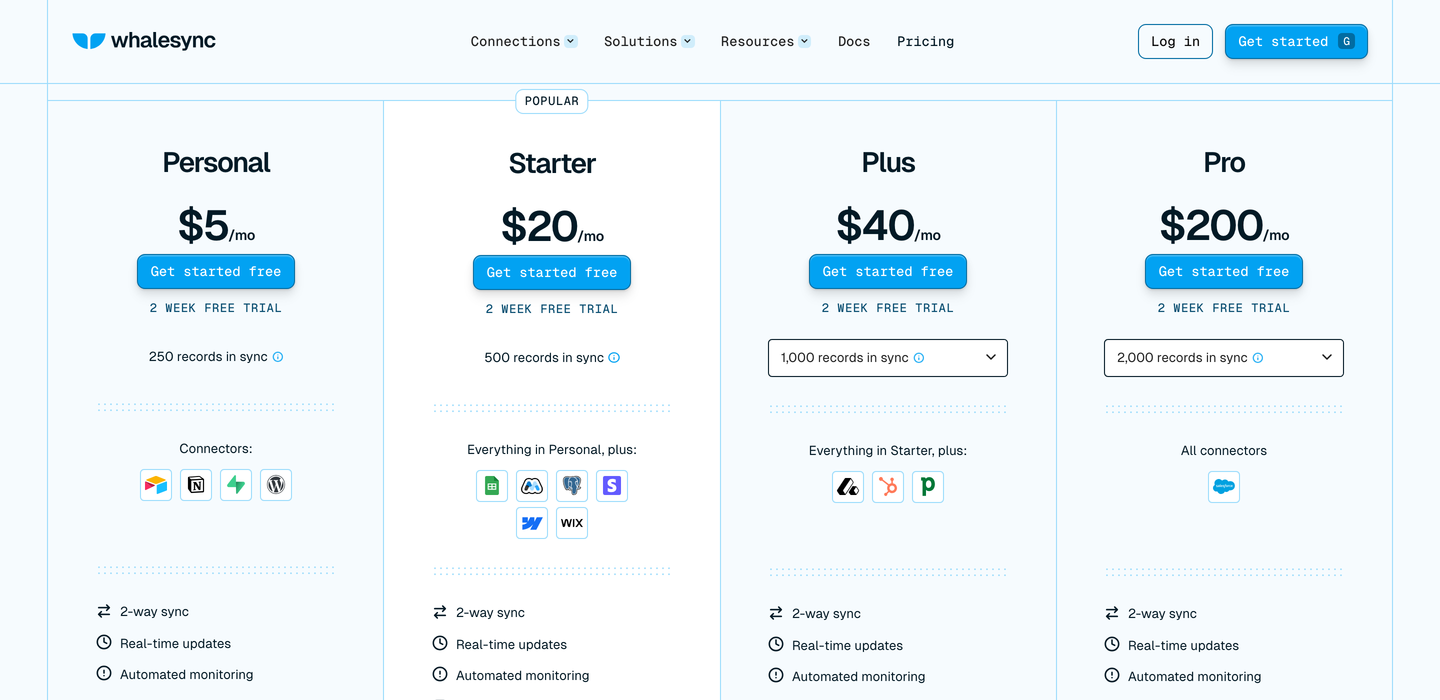
Whalesync's own pricing page, showing four plans: Personal at $5 per month for 250 records in sync, Starter at $20 for 500 records, Plus at $40 starting at 1,000 records, and Pro at $200 starting at 2,000 records. Each plan lists its connector icons and a two week free trial.

Whalesync's pricing page, captured the day these figures were checked. Screenshot taken on 22 July 2026. Plus and Pro carry a record-count selector, so the figure shown is the entry point for that tier.

Checked on 22 July 2026, from each vendor's own pricing page.

Whalesync. Personal $5 a month, 250 records in sync, four connectors: Airtable, Notion, Supabase and WordPress. Starter $20 a month, 500 records in sync, adding Google Sheets, Memberstack, Postgres, Stripe, Webflow and Wix CMS, with email support. Plus is $40 a month starting at 1,000 records in sync, Pro is $200 a month starting at 2,000, both selectable up to 50,000, adding the CRM connectors and, on Pro, priority support and a security assessment. Every plan advertises two-way sync and real-time updates. Yearly billing is advertised as saving up to 20 per cent. Two-week trial, no permanently free plan.

Airtable to Sheets. Starter $9 a month or $90 a year, manual sync, up to 3 tables or views. Pro $19 a month or $190 a year, unlimited tables and views, scheduled sync every 3 hours, priority support. Business $39 a month or $390 a year, everything in Pro plus two-way sync. Flat per account: no per-user charge, no per-row charge, no record cap. Seven-day trial, no credit card, 30-day money-back guarantee. Full detail on pricing.

The honest read: at 500 records or fewer, Whalesync is cheaper for two-way and far faster. Past 500 records their price starts climbing with the row count, and ours does not move.

Who should choose Whalesync

If the gap between an edit and its appearance in the other tool is measured in seconds and that matters to the work, buy Whalesync. A dispatch board, a live inventory count, a signup form writing into Airtable that has to hit a spreadsheet before someone acts on it: three hours is useless for all of those, and we are not going to pretend otherwise.

Buy Whalesync if Google Sheets is one stop on a longer route. Their shape is a hub: an Airtable base holding the operational record while Webflow shows it publicly, Postgres holds it for the product, and Stripe or HubSpot feed it. Keeping four tools level is a job we do not do at all, because we connect exactly two.

Buy Whalesync if edits have to flow both ways all day without anyone pressing a button, or if linked records and attachments have to travel back into Airtable from the spreadsheet side, where their documented field support is wider than ours. And buy Whalesync if your table is small: under 500 records, $20 a month buys speed we cannot sell at any price, and the comparison is not close.

Who should choose Airtable to Sheets

Most people looking for a Whalesync alternative are looking because of the record cap, so start there. Choose this if the spreadsheet is a report, a dashboard, a forecast or a client-facing view that gets opened a few times a day. A number that is correct at 9am, noon and 3pm is correct enough for that work, and paying for seconds when the sheet is read twice a day is buying speed nobody will see.

Choose it if the table is big. Several thousand rows, tens of thousands, a full year of records: the price is the same $39, with no cap to hit halfway through the quarter and no quote to request.

Choose it if you want the sync to sit inside Google. It installs into the spreadsheet, the schedule lives in your Google account, and nothing else needs a login. The person who inherits this in six months finds it in the sidebar of the file they already have open.

Choose it if you sync Airtable views. Point the sync at a view and its filter and sort come with it, so a client sees the filtered subset and never the columns behind it. Whalesync's docs state that view-based syncing does not run at the same time as their two-way sync, so if you want both, check that with them first.

Two columns of five ticks each, headed Pick Whalesync and Pick Airtable to Sheets. Whalesync wins jobs needing changes within seconds, multiple connected apps, linked records and attachments writing back, small tables on a small budget, and both sides edited all day. Airtable to Sheets wins large tables at a flat price, reports read a few times a day, Airtable views arriving with their filter, one flat bill, and no extra service between the two tools.

The verdict

Whalesync sells speed and breadth: two-way sync across fifteen connected tools, published as real-time, priced by how many records you keep in agreement, $20 a month for 500 of them and quoted individually above that. Airtable to Sheets sells one route between two tools at a flat price with no record cap, refreshed every three hours because that is what a Google Sheets add-on is allowed to do. Pick the first if the clock matters. Pick the second if the row count does.

Common questions

Is Whalesync's sync really instant?

Whalesync publishes "real-time updates" on every plan and says a change in one app syncs to the other instantly. They publish no interval in seconds or minutes, so there is no vendor figure to quote. Their Airtable connection watches the base for changes rather than waiting for a clock, which is a different mechanism from a scheduled run.

How much does Whalesync cost for Airtable and Google Sheets?

Twenty dollars a month, checked on 22 July 2026. The $5 Personal plan covers Airtable but not Google Sheets, so the Google Sheets connector starts on the $20 Starter plan, which allows 500 records in sync. Above 500 records you are on Plus, which starts at $40 a month for 1,000 records in sync, or Pro at $200 for 2,000.

What is the cheapest way to get two-way sync between Airtable and Google Sheets?

Below 500 records, Whalesync's $20 Starter plan. Above 500, our Business plan at $39 a month flat, since there is no record cap on our side and their next tier is quoted rather than published. Compare on your row count, not on the entry price of each page.

Is this a fair Whalesync review?

It is a comparison written by a competitor, which is why every Whalesync figure here is dated and sourced to their own pages. It is not a review of how well their product runs, because we do not run it in production and have no basis for that judgement. Read their documentation and take their two-week trial for that.

Can I use both?

Yes, and some people should. Whalesync between Airtable and the tools that have to move fast, and a scheduled sync into a separate spreadsheet for the monthly reporting nobody should be editing.

Related reading